Showing posts with label Basketball. Show all posts

Monday, August 5, 2024

Weighted Olympic Medal Count 2024

In honor of the 2024 Summer Olympic Games currently being held Paris, France, I've updated my Microsoft Excel spreadsheet template for the medal count as I did for the 2022 Winter Games, 2020 (2021) Summer Olympic Games, 2018 Winter Olympics, 2016 Summer Olympic Games, 2014 Winter Olympics and 2012 Summer Olympics. 

There are two primary methods most websites appear to be ranking the 2024 medal count. Most sites rank countries by the total number of Olympic medals won. Other sites, like the International Olympic Committee (or IOC) rank countries by their gold medal count. And others rank by other factors like per capita or GDP.

Pictured below is a bar chart showing all medals won for the top countries (as of the time of this posting on 2-14-22). The bar chart is created in Excel by highlighting the data then going to Insert>Bar>Stacked Bar chart. Change the colors of the bars by right clicking on them then use the drop down menu to select the data you want to change.


See the latest official medal count here.


I’ve devised my own ranking system to give each Olympic medal a weight where the silver is worth half a gold medal and a bronze is worth only a quarter of the gold. Based on this new scoring system, previous Olympic results suddenly became quite interesting. However, for the 2024 Summer Games not too much actually changes (so far, will revisit after more events are completed). The first five countries ranking is unchanged. It gets really interesting in the 25-35 range.


Download the 2024 Olympic Games medal count spreadsheet and see for yourself. 

I’ve shared my Olympic Medal Count spreadsheet and listed out the Olympic medals by country. How would you weight each medal against the others? Comment below and share any of your Olympic medal rating systems!

Monday, April 8, 2024

Excel Sports Bet Tracking Spreadsheet Updated

I've updated the Sports Bet Tracking spreadsheet template with some of the features you've been requesting! The upgrades include:

American or Decimal Odds

Choose between American or Decimal odds by using a drop down list on the first sheet. All bets need to use the same odds type and you shouldn't change it once set. 


What's the difference between American and Decimal odds?

Decimal odds (European odds) represent the potential return of a bet, including the original stake, as a multiple of the stake. The odds are presented as a single number, usually with two decimal places. Example: 2.5

American odds, also known as moneyline odds, are a popular format for expressing the likelihood of a particular outcome in sports betting, especially in the United States. American odds can be positive or negative numbers and indicate how much profit a bettor would make on a $100 wager if the bet is successful. They provide a straightforward way for bettors to understand the potential profit or risk associated with a particular bet. Example: -205, +155

Change to Macro Enabled Worksheet

The format of the bet tracking spreadsheet has been changed from .xlsx to .xlsm as I've added a few simple macros.


Click the "Add New Bet" button to input a new bet. Previously you had to scroll to the bottom of the Bet Tracker sheet to add a new bet and potentially drag down all formulas to track the stats. Now the newest bet will always be at the top and you won't have to manually manipulate any formulas.

If you want to clear all your bets there is a button that will do that but be careful - the action cannot be undone.

I don't think macros will work on MAC/iOS/APPLE devices, so you might have to manually drag down the formulas.

Cash Out and Voided Bets can now be tracked

The ability to Cash Out has also been added as well as void or push bets can now be tracked. If you cash out, enter the value you cashed out for in column K, otherwise leave column K blank. If you want to track void or cancelled bets you can select Void from the drop down then delete your wager amount and leave it blank since you get that money back.

How to Transfer Information From Old Versions

In the Bet Tracker sheet, I think columns A through K should be the same so you can copy and paste those, then drag down the formulas in row 2 for columns M-Y.


Let me know what you think about the improvements to the Sports Bet Tracking Spreadsheet in the comments below! And as always, I valuable your feedback if you have ideas for even more improvements. 

Monday, March 18, 2024

2024 March Madness Brackets and Basketball Squares

If you're looking for 2024 March Madness Brackets, no, I won't be posting any here or making my own. Once again, I will be using the best March Madness brackets in Excel, created by David Tyler (and I will continue to use his until he decides to no longer update them). They’re very polished and easy to use. There are only 68 teams in the field but the spreadsheet is already setup to handle up to 128 teams, if they expand in the future. There are two sheets: the bracket and the pool manager. Instructions are included but its very intuitive. Take a look:


As I’ve said countless times before, you can learn a lot by looking at Excel templates made by others. Here are 5 things I do when examining a new spreadsheet using David's March Madness brackets as example.

March Madness Squares

When I created my new Super Bowl Squares Unlimited spreadsheet for last month's football game, I had the goal in mind to be able to use the same sheet for other sports, like basketball. I tweaked my template a little and now you can use it for March Madness Squares!


There's multiple ways you could go about playing March Madness Squares:

1. Everyone keeps the same random numbers for every game
2. The random numbers change for every round
3. The random numbers change for every game

Here's a quick demo of how to use squares for basketball:


You can play either way with my spreadsheet. I designed it to be very versatile. Payout percentage can change per round as well. Update the settings how you want them then you click Generate Scoreboard once for every game, so 32 times in the first round. There are a lot of other options built in that can be ignored - it's all up to you!

Will you be playing 2024 March Madness Brackets, March Madness Squares, or both? Let me know in the comments below.

Saturday, March 11, 2023

2023 March Madness Squares

When I created my new Super Bowl Squares Unlimited spreadsheet for last month's football game, I had the goal in mind to be able to use the same sheet for other sports, like basketball.  I tweaked my template a little and now here it is for the first time - March Madness Squares!


Super Bowl squares are a popular game often played during the Super Bowl where participants select squares on a grid, with each square assigned a specific combination of numbers. The goal is to correctly predict the final score of the game based on the last digit of each team's score.

While Super Bowl squares are typically played during the Super Bowl, the concept can also be applied to March Madness. To play this game, you can create a grid with 100 squares, just like in the Super Bowl squares game. Instead of using the final score of the game, the grid will be based on the final score of each March Madness game.

Each square in the grid represents a combination of the final score of the two teams playing in the game. For example, if the final score of a game is 85-76, the winner would be the square where the "5" intersects with the "6" on the grid. You can assign a prize to each square, and participants can buy as many squares as they want.

There's multiple ways you could go about playing March Madness Squares:

1. Everyone keeps the same random numbers for every game
2. The random numbers change for every round
3. The random numbers change for every game

You can play either way with my spreadsheet. I designed it to be very versatile. Payout percentage can change per round as well. Update the settings how you want them then you click Generate Scoreboard once for every game, so 32 times in the first round. There are a lot of other options built in that can be ignored - it's all up to you!


Download March Madness Squares here.

Usually, when it comes to March Madness I use David Tyler's incredible brackets in Excel. I'll still be using them this year but in addition I plan on trying March Madness Squares for the first time. Have you ever played before?

Try it and let me know what you think!

Sunday, January 22, 2023

Elevate Your Sports Betting Game with Our Free Excel Tracking Tool

Sports gambling just became legal here in Ohio and we've been flooded with sign-up offers. Since just about every sportsbook will give you free bonus bets (around $200) for a small ($5 or $10) deposit, I decided to dabble a little bit into sports betting to see what all the fuss is about. I signed up for three different sportsbook sites and quickly realized I needed a way to organize and track all my bets.


Naturally, I decided to make an Excel template to track which bets I'd made, track my earnings, and make sure I was still making a profit. First, I created a Lists sheet for all my drop down lists including which sportsbook, which sport, result, and so on. Personally, so far I've only stuck to football because that's what I follow the most and already have some interest and knowledge in it.


The Bet Tracker sheet is used to track every individual bet including the odds, wager amount, and formulas to determine the potential winnings and the actual result.

bet tracker sheet

When you bet with your own money, if you win the bet you get the winnings plus your original bet back. But when you use Bonus money to place your bet, that "fake" money is not added to the winnings. I had to account for this in my Potential Winnings column formula.

If your own money then: Winnings = ((Odds/100)*Wager)+Original Wager

If bonus money then: Winnings = (Odds/100)*Wager)

=IF(E2="My$",((G2/100)*F2)+F2,((G2/100)*F2))

If you get lucky and win a bet, you'll be able to withdraw the money into your own bank or Paypal account. There's a summary sheet to track exactly how much money you've put in versus what has come out. The most important stat to me is my running total, and making sure it is well in the positive otherwise it's time to quit. 


How have I done? In the past two weeks, I placed 33 bets and won 8 of them. I've only had to input $27 of my own dollars, while I've gotten to bet $650 bonus bucks. I'm not huge into taking risks, so instead of betting on crazy parleys with larger payouts, I've bet on safer, more likely outcomes but with smaller rewards. What do I plan to do with my winnings? Probably invest in an AI company since they're changing the game.

In all my years of making sports related Excel spreadsheet templates, I've never really gambled on sports. I'm not sure I'll keep gambling once my free funds run out, but it is a fun experiment while it lasts. Like playing fantasy football or Super Bowl Squares, it gives you an extra incentive for watching the game. Hey, speaking of Super Bowl Squares, I've got a new version coming out this weekend and I can't wait to hear your thoughts on it...

.Download Sports Bet Tracker.xlsx file here

Monday, March 15, 2021

Excel Tips from the Best 2021 March Madness Brackets

After a year hiatus it’s finally here, the college basketball March Madness brackets are back! Last year, I made a NFL Draft Game spreadsheet for the first time to try to compensate for the loss of the basketball brackets but it just wasn’t the same (but I did still update it for 2021). This year, the 2021 NCAA men's basketball tournament will be unlike any March Madness that has come before. All games will be played in Indiana, with most in Indianapolis. The schedule has also been change. The First Four would typically be played on Tuesday and Wednesday night with the first round being played on Thursday and Friday. 

Here's the 2021 March Madness schedule:

  • First Four — 4 p.m. start on Thursday, March 18
  • First round — 12 p.m. start on Friday, March 19, and Saturday, March 20
  • Second round — 12 p.m. start on Sunday, March 21, and Monday, March 22
  • Sweet 16 — 2 p.m. start on Saturday, March 27, and 1 p.m. start on Sunday, March 28
  • Elite Eight — 7 p.m. start on Monday, March 29, and 6 p.m. start on Tuesday, March 30
  • Final Four — 5 p.m. start on Saturday, April 3
  • NCAA championship game — 9 p.m. Monday, April 5

Once again, I will be using the best March Madness brackets in Excel, created by David Tyler (and I will continue to use his until he decides to no longer update them). They’re very polished and easy to use. There are only 68 teams in the field but the spreadsheet is already setup to handle up to 128 teams, if they expand in the future. There are two sheets: the bracket and the pool manager. Instructions are included but its very intuitive. 

march madness 2021 bracket spreadsheet template


The First 5 Things I Do When Examining Someone Else's Spreadsheet

As I’ve said countless times before, you can learn a lot by looking at templates made by others. Here are 5 things I do when examining a new spreadsheet:

1. Unhide hidden sheets, columns, and rows: When you make a template others are going to be using, you want to make it look nice and clean and hide anything that could cause confusion to a first time user, which leads to hiding rows, columns, or even entire sheets in a workbook. So, the first thing I do when examining someone else’s template is look for the hidden data. Right click on the sheets tab and click “unhide”. I unhide all the hidden sheets if there are any to see what data is present. Look for any hidden columns or rows as well by seeing if any letters or numbers are skipped.


2. Understand the NamedRanges: Go To Formulas > Name Manager and examine what the named ranges are, what sheets and cells they refer to. Hopefully they're all named well, like in David's brackets.


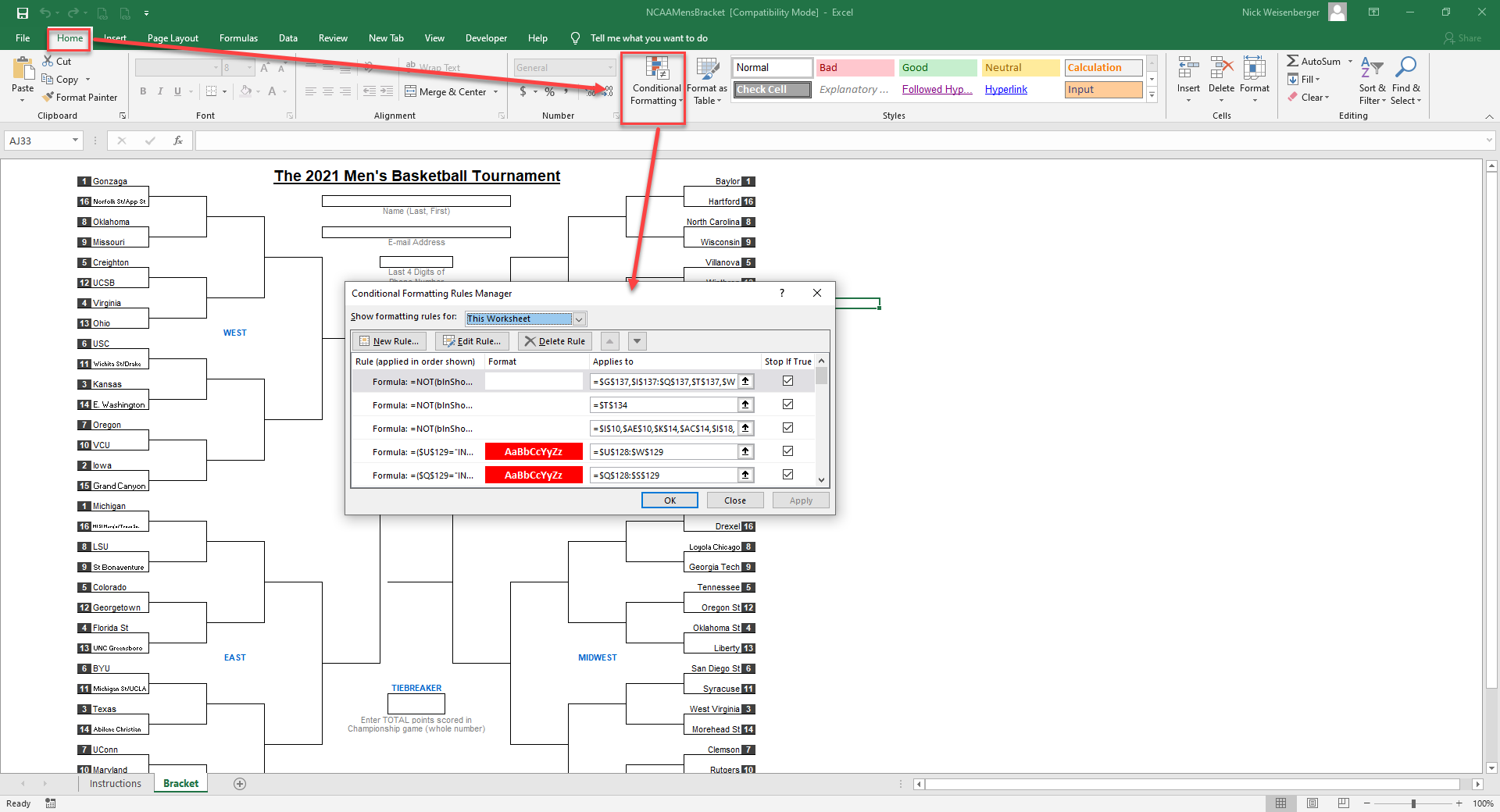
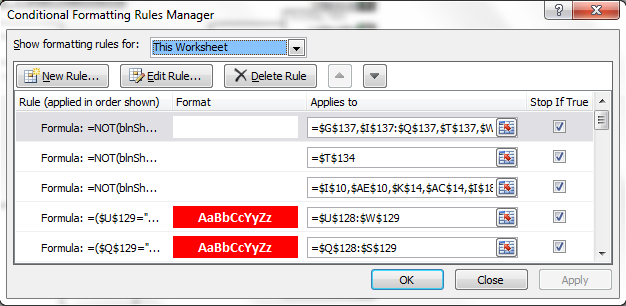
3. Look at conditional formatting rules: On the Home tab, go to Conditional Formatting, click Manage Rules, then Show formatting rules for This Worksheet to view them all.


4. Look through the formulas: On the Formulas tab, click “show Formulas” to show if they were manually typed in or if there is a formula calculating the values


5. Look through the macros: Hopefully, the person writing the code left lots of good comments so it’s easier to follow along with what each piece of code does


Watch me quickly walk through David's 2021 March Madness brackets going through the five points listed above:


Monday, March 12, 2018

2018 March Madness Excel Brackets

Spoiler Alert: This post is going to mostly be a re-hash of my same March Madness Excel bracket posts from the past eight years.

It’s the most wonderful time of the year! March Madness 2018 is here and the first of the four “play-in” games will begin on Tuesday, March 13th . Once again, I’ll be using David Tyler’s NCAA Excel brackets, the same ones I’ve been using since at least 2010, as they're still the best as far as I’m concerned. I'd like to give a special thanks to David for continuing to update, tweak, and post his excellent brackets each and every March and giving us something to look forward to as we crawl out of the final few weeks of winter (snowing again here in Ohio, I hoped we were done with winter).

I’m a firm believer that a great way to increase your Excel knowledge is to reverse engineer Excel spreadsheet templates, like these office pool March Madness brackets. Previously, I’ve shared 11 things you can learn from the best Excel brackets and they all still apply for this year’s version. David doesn't lock or hide anything behind password protection so you can examine all the formulas to see how they work and make any modifications you desire.

There are two files: the bracket manager and the individual bracket file, that can be downloaded by following the link below. Download the files and start picking them apart!
http://www.whistleblows.com/p/bracket.html

If you’re worried you might not be able to use the March Madness Excel brackets have no fear. They are easy to use and you can watch this short video I made to show you just how easy it is to use David's brackets. Simply click on each team to advance them (don't forget to enable macros).


  • A No. 16 seed has never beaten a No. 1. Like ever.
  • A No. 12 seed usually beats a No. 5 seed.
  • Odds of picking a perfect bracket: 1 in 9.2 quintrillion.
  • Odds of picking a perfect bracket using historical data and basketball knowledge: 1 in 128 billion.

I know some readers of this blog skip over the templates I post, especially if they're sports related. but there really are many lessons that can be learned by examining them that you can apply to your own spreadsheets to improve them. What new lessons about Excel have you learned by breaking down a template?

Monday, March 13, 2017

2017 March Madness Excel Brackets

It’s the most wonderful time of the year! March Madness 2017 edition is here and the first of the four “play-in” games will begin on Tuesday, March 14th (which we’re not counting off any points for in my office pool). Once again, I’ll be using David Tyler’s NCAA Excel brackets, the same ones I’ve been using since at least 2010, as they're still the best as far as I’m concerned. I'd like to give a special thanks to David for continuing to update and post his excellent brackets each and every March and giving us something to look forward to as we crawl out of the final few weeks of winter (70 degrees a few weeks ago here in Ohio, now it’s snowing!).

I’m a firm believer that a great way to increase your Excel knowledge is to reverse engineer Excel spreadsheet templates, like these office pool March Madness brackets. Previously, I’ve shared 11 things you can learn from the best Excel brackets and they all still apply for this year’s version. David doesn't lock or hide anything behind password protection so you can examine all the formulas to see how they work and make any modifications you desire. There are two files: the bracket manager and the individual bracket file, that can be downloaded by following the link below. Download the files and start picking them apart!

http://www.whistleblows.com/

 If you’re worried you might not be able to use the March Madness Excel brackets have no fear. They are easy to use and you can watch this short video I made to show you just how easy it is to use David's brackets. Simply click on each team to advance them (don't forget to enable macros).


 As far as actually filling in the bracket, here are some interesting stats about March Madness and a few tips that might help you choose your teams.
  2017s-March-Madness-By-The-Numbers-v5
Source: WalletHub


  • A No. 16 seed has never beaten a No. 1. Like ever.
  • A No. 12 seed usually beats a No. 5 seed.
  • Odds of picking a perfect bracket: 1 in 9.2 quintrillion.
  • Odds of picking a perfect bracket using historical data and basketball knowledge: 1 in 128 billion.


I know some readers of this blog skip over the templates I post, especially if they're sports related. but there really are many lessons that can be learned by examining them that you can apply to your own spreadsheets to improve them. What new lessons about Excel have you learned by breaking down a template?

Wednesday, March 16, 2016

March Madness 2016 Excel Brackets

It’s the most wonderful time of the year! March Madness 2016 edition is here and the first of the four “play-in” games have already begun (which we’re not counting off any points for in my office pool). Once again, I’ll be using David Tyler’s NCAA Excel brackets, the same ones I’ve been using since at least 2010, as they're still the best as far as I’m concerned. David doesn't lock or hide anything behind password protection so you can examine all the formulas to see how they work and make any modifications you desire. There are two files: the bracket manager and the individual bracket file, that can be downloaded by following the link below.


A great way to increase your Excel knowledge is to reverse engineer templates, like these office pool March Madness brackets. Last year, I shared 11 things you can learn from the best Excel brackets and they all still apply for this year’s version.

I'd like to give a special thanks to David Tyler for continuing to update and post his excellent brackets each and every March and giving us something to look forward to as we crawl out of the final few weeks of winter.

I also created a short screen capture video to show you just how easy it is to use David's brackets. Simply click on each team to advance them (don't forget to enable macros).


Pictured below is my bracket. You should probably just go ahead and treat it like the Bible, Koran, and Torah all rolled into one. It’s as good as truth.


Good luck in your office pools!

Nickstradomus


*just a special note to my email subscribers: I will hopefully have an option soon where you can opt out of notifications about sports templates, that is if you only want to read about my general Excel tips and tricks.

Monday, March 16, 2015

11 Excel Lessons from the Best March Madness Brackets


I preach this lesson all the time around here, I know, but you can seriously learn so much about Excel simply by examining templates and other professional's spreadsheets. The 2015 March Madness brackets are no exception. This downloadable template for the 2015 NCAA basketball tournament is an outstanding example of how to harness the full power of Excel and it doesn't involve finances, inventory, tracking, engineering, or charts.

2015 march madness bracket excel

B. David Tyler’s NCAA Excel brackets are the best I've seen, and I've been using his brackets since at least 2010. David doesn't lock or hide anything behind password protection so you can examine all the formulas to see how they work and make any modifications you desire.
There are two files: the bracket manager and the individual bracket file. First, download the files here:

http://www.whistleblows.com/2015/03/ncaa-2015-excel-bracket-and-pool.html

Now, open the files and start picking them apart! Listed below are 11 Excel lessons that can be learned from digging into these two templates:


1. Formatting - The bracket sheets are nice and clean and easy to use. Why is that? Because there isn't a lot of flare or unnecessary stuff to distract you. Only a few colors are used, grid lines are turned off, all the font sizes and colors make sense, etc. Less is more.

2. Hidden sheets - When you first open the NCAA bracket you only see two sheets: instructions and the bracket. But if you right click on one of the sheet tabs and click unhide you’ll see there are some hidden sheets, and it’s these sheets that do a lot of the heavy lifting. The beauty of the brackets is the fact you don't have to modify a single formula yourself, everything has been done for you.


3. Protection - When other users are going to be using your spreadsheet you may want to use protection to protect key cells. Fortunately, David did not use a password on the protection, so you can unprotect the sheets to see what all the exact formulas are.

4. Conditional Formatting - Conditional formatting is where you set up rules to change the format of a cell based on a condition. When you get a pick in the bracket incorrect you’ll notice the font turns red with a strikethrough. This is done through conditional formatting. To see how it works, go to the Home tab, click on Conditional Formatting, then Manage Rules. Show formatting rules for: Sheet: Bracket then scroll down and see all the rules.


5. Organization - The 2015 NCAA bracket shows you how to structure a spreadsheet that is potentially going to be used by thousands of strangers - everything is clearly labeled, instructions are included, and there’s information about where to go if you need help.

6. Drop Down Lists - After you make a few selections, you may get second thoughts and decide to go back and change your picks. To do so, you’ll change the winning team by picking from a drop down list. To see how the drop down list works, go to the Data tab, then Data Validation.You’ll see the setting is List and uses a Defined Name. Go to Formulas tab then Name manager to see all the defined names.

7. Error Checking - Are there little green triangles on the cells that are annoying you? To remove them, go to File>Options>Formulas>Error Checking and uncheck the “Enable background error checking” box. There is also a macro in the bracket file used to check for common errors.


8. Macro: HTML Export File - One of the macros included in the pool manager file shows you how you can export an Excel sheet to a HTML file (called exportLeaderBoard). Open the Excel document and press Alt-F11. This will open up the Visual Basic editor, and by clicking on sheet and module names on the left side of the screen you will be able to view all the code.

9. Macro: Import Multiple Excel sheets - One of the best features of the bracket manager file is the ability to automatically import multiple brackets into the manager all at once. This is done via an Excel macro. All the work is done for the user, as the manager of the pool I simply have to place brackets into a folder then press a button. The user’s of your spreadsheets will really appreciate it if you make everything easy for them.

10. Macro: Hyperlinks - Another nifty feature of the basketball brackets is the ability to simply click on a team to advance them. This is accomplished with a very cool hyperlink macro.  The code is run every time a hyperlink is clicked and it checks to see if a game cell is selected, and if so, it advances the team that was selected.

11. Spreadsheets can be fun! - For many, the mention of Microsoft Excel brings up nightmares of pie charts, pivot tables, and data entry. But using Excel can be fun, especially when you’re competing in an office pool. I really like the feature in the manager file that let’s you run scenarios: what if this team wins, and this teams loses, what are my chances of winning?

I know some readers of this blog skip over the templates I post, especially if they're sports related. but there really are many lessons that can be learned by examining them that you can apply to your own spreadsheets to improve them. Special thanks to David Tyler for continuing to update and post his excellent brackets each and every March. What new lessons about Excel have you learned by breaking down a template?

Wednesday, April 16, 2014

2014 NBA Playoff Bracket in Excel

The regular season is over and it's time to download your 2014 NBA Playoff Bracket Excel file. The NBA playoffs start Saturday, April 19, three days after the end of the regular season today. All first games of the eight first round matchups will be played either April 19 or 20. Sixteen of the 30 league teams make the playoffs, eight from each conference. This produces eight first round matchups and no team gets a first round bye. Each matchup in all rounds is a best 4 out of 7 series in this format: HHAAHAH. Download the basketball bracket using the link below:

2014 nba playoff bracket in excel


  Remember, the NBA finals start Thursday, June 5. I'm looking forward to it, how about you?

Sunday, March 16, 2014

2014 March Madness Brackets in Excel

March Madness 2014 edition is here! Watching the NCAA Men’s Basketball Tournament is one of my favorite times of the year. Over the years I've created a large number of brackets and spreadsheets for other sporting events, like Superbowl Squares, NCAA Bowl Prediction Pool, heck even a horseshoes spreadsheet (and you can find all of my custom creations on the downloads page).
2014 march madness bracket in excel


However, I’ve never created an Excel bracket or pool manager for March Madness. Why? There’s been no need since discovering David Tyler’s bracket. If you’re planning on running a March Madness pool with Excel I highly recommend downloading and using David’s template as they’re simply the best Excel brackets around.


There's two files, a bracket and a pool manager. All players complete their own bracket in Excel and send to the pool manager. You save all the player's brackets in a folder then open the manager sheet. There's a built in macro that will import all the player's brackets into the pool manager. It's really awesome and easy to use. Instructions are included in the file. I really like how you can run different scenarios, like “if this team wins and this team wins then I’ll win the pool but if this other team wins and this other team loses then I’ve no chance at winning.”

Here's what the Excel bracket looks like, just click on each team's name to advance them:

2014 ncaa bracket excel spreadsheet


You can download David’s March Madness brackets for free here:


A few tips to help you complete your 2014 NCAATournament bracket:

  • A No. 16 seed has never beaten a No. 1. Like ever.
  • A No. 12 seed usually beats a No. 5 seed.
  • Odds of picking a perfect bracket: 1 in 9.2 quintrillion
  • Odds of picking a perfect bracket using historical data and basketball knowledge: 1 in 128 billion


If you have any questions about how to use the files feel free to let me know and I’ll do my best to help you out.

Monday, March 10, 2014

2014 Big Ten Tournament Bracket Spreadsheet


March is here which means March Madness is just around the corner! But before we can get to the field of 64, err 68, the conference champions have to be crowned. Since I support and live in Big Ten country I’ve made a 2014 Big Ten Tournament Bracket in Excel that you can download for free using the link below. Michigan, Wisconsin, Michigan State and Nebraska(!) are the number one seeds and get first round byes. I’ve included the complete schedule including game times and TV stations. If you’re not a Big Ten fan you can use my spreadsheet as a template to make brackets for the other conferences.
 
2014 Big Ten Tournament Bracket Spreadsheet

Download: 2014 Big Ten Tournament Bracket and Schedule.xls

Thursday, April 18, 2013

2013 NBA Playoff Bracket Download

The NBA Playoffs start on Saturday, April 20th (two days after the end of the regular season), thus you don’t have a lot of time to complete your 2013 NBA Playoff bracket. All the first games of the eight first round match-ups will take place on either April 20 or 21st.

The NBA playoff structure is a bit unique in that there are no first round byes, all sixteen teams (eight from each conference) compete in the first round of the playoffs. The format of the NBA playoffs consists of each team needing to win four out of seven games in order to advance to the next round. In the first three rounds of the playoff the series follow this home and away format: HHAAHAH.  The Finals follow the format: HHAAAHH.


Miami has clinched the number one seed in the East while Oklahoma City wrapped up the West. My Cleveland Cavaliers will be watching from home again. Who do you think will win the title? Miami has looked nearly unstoppable this season and I think it will be a major shock and upset if they do not win it all. What about you?

2013 NBA Playoff Bracket.xls download

Monday, March 18, 2013

2013 NIT Bracket Spreadsheet

2013 NIT Bracket
 
If you’re an avid NCAA men’s basketball fan and March Madness isn’t enough for you than you can also download the 2013 NIT Tournament Bracket. The National Invitation Tournament is comprised of many of the teams that some argue should have been in the NCAA tournament field but got left out. You would think all of these teams would be really bad when in reality some automatic bids to the NCAA tourney go to really bad teams (twenty loss Liberty, for example) thus teams like Kentucky, Iowa, Ohio University, are forced out of the field of 68 and into the NIT. This is still a good thing for these teams because they get the extra practices with come with the postseason while the other teams are sitting at home until next year.

This bracket is pretty straight forward. I’ve included the dates, times, and TV coverage for each game. However, there is no Pool Manager for the NIT spreadsheets (have you ever heard of anyone running an NIT pool anyways?).

Sunday, March 17, 2013

Downloadable 2013 NCAA Tournament Bracket

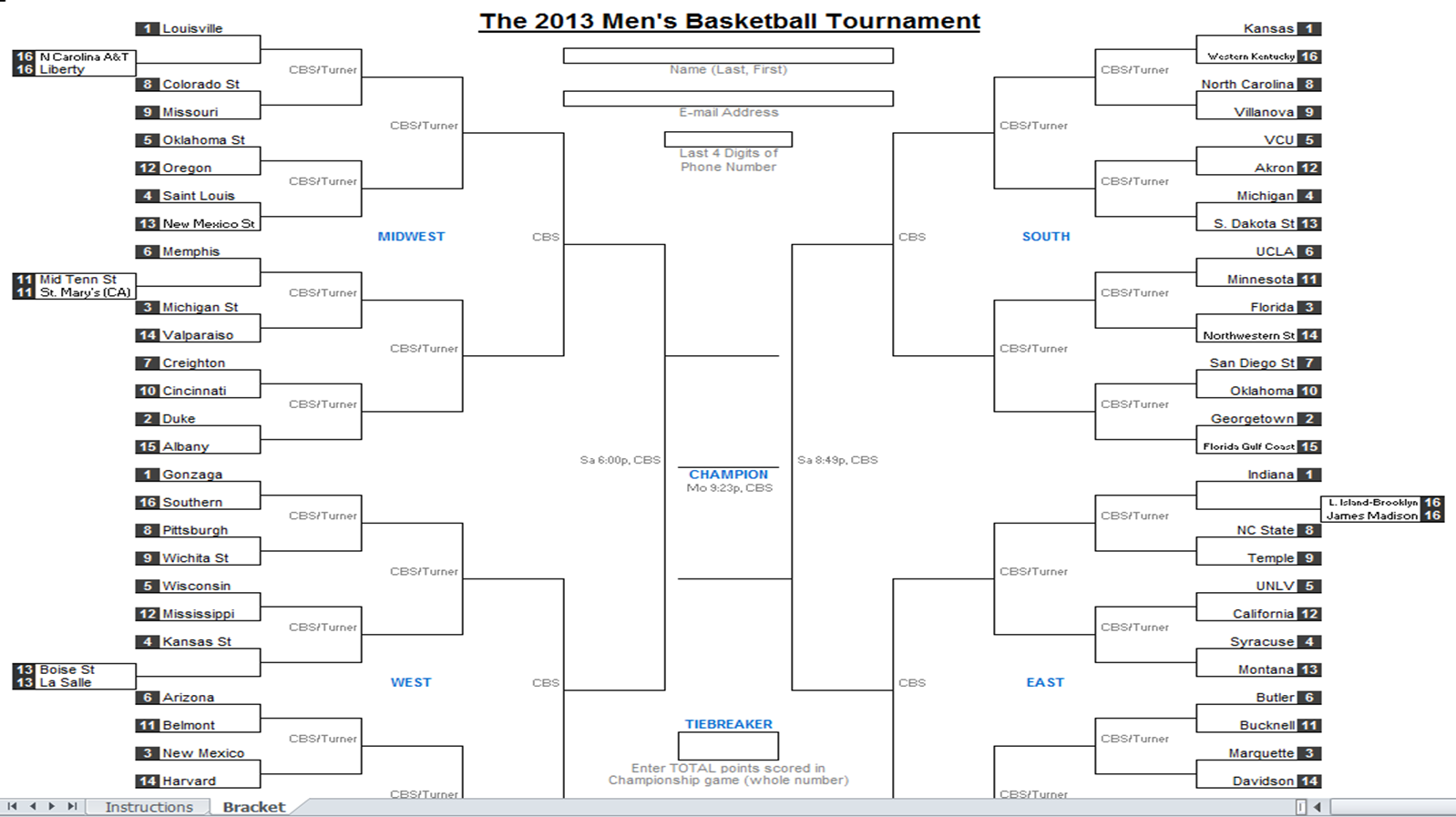
The downloadable 2013 NCAA Tournament Brackets are here! It's finally time to download and print your 2013 March Madness Brackets. I’ve made my own tournament brackets for almost every other major sporting event (see them all in the downloads page) but I’ve never attempted to make my own March Madness brackets. Why? Because for the last several years I've used David Tyler's spreadsheets, which I consider to be the best NCAA Excel brackets out there and are nearly flawless in my opinion. They're free to download too!

downloadable 2013 ncaa tournament bracket

David has created two separate files: the actual tournament brackets where you predict the winners of each game and a separate bracket manager for office pools. You must use his brackets in order to use the pool manager (and make sure macros are enabled).
2013 march madness pool manager
Download the 2013 NCAA Tournament Bracket.
Download the 2013 March Madness Pool Manager

Instructions are included with the spreadsheets. To learn more about how the brackets are created read our interviews with David from 2010 and 2011. Also, be sure to visit David’s website, When the Whistle Blows.

My Buckeyes won the Big Ten Tournament and are one of the hottest teams in the nation right now. Who do you have winning the big dance? Let us know in the comments below!

If you would like to you can join my basketball pool on Yahoo's Tourney Pick'em.
 

Thursday, March 7, 2013

Printable Big Ten Tournament Bracket 2013

big ten tournament bracket 2013
I’ve never done this before but being a big fan of the Big Ten I’ve decided to create a printable Big Ten Tournament Bracket this year. The men’s basketball tournament begins on Thursday, March 14th in the heart of Big 10 country at the United Center in Chicago, Illinois. The cool thing about this editable Excel bracket is it includes the complete Big Ten basketball tournament schedule including all of the game times and television channels. Currently, I only have seedings listed. I will list the actual teams once they are known and then update the spreadsheet on Sunday.


Download the all in one bracket and Big Ten Tourney schedule here.

I can’t wait until the Big Ten Tournament starts! There are so many questions to answer: Will Michigan have an early exit? Is Indiana fading? What Minnesota team will show up? Can Iowa or Illinois spring an upset? How far can Ohio State go? With the way each of the top five teams have dropped random games they should have won this year I’d argue there is no clear favorite to win the Big Ten Basketball Championship. What do you think? I’d love for you to share your thoughts on the Big 10 tournament!


Check back soon for the 2013 March Madness brackets and download our new Excel Spreadsheets Help Android app!

Sunday, October 7, 2012

NBA 2012 Schedule Download


nba schedule excel
The NBA 2012 schedule has been released and I’ve created a Microsoft Excel spreadsheet of it available for free download. The NBA preseason has already begun (not included in the Excel file) and the regular season begins October 30th. File is hosted on box.com. If you're an NBA fan you can also check out our mock draft creator.  The NBA 2013 schedule is sorted by teams and by date. Remember, when the playoffs roll around (seems like a long, long ways off for now) we'll have a playoff bracket for you to download. Until then, enjoy the regular season!

 
Check out the updated Excel Downloads page for more spreadsheet templates or join our newsletter to receive the latest updates automatically in your inbox.

What pro basketball teams are you rooting for? Does anybody in the NBA use the Flex offense?

-Nick
Probably not watching much pro basketball until May