So to help alleviate some of my stress I started compiling my own holiday gift guide. It’s kind of like the big toy catalog you used to get as a kid, only this is for adults. I’ve made a list of items I think would be very useful or exciting for your fellow Excel users, sorted by different categories. Some of these items I already use on a daily basis and others are things that are on my own personal wish list. It's my biggest and best gift guide yet! Enjoy!
Thursday, November 26, 2020
Gift Guide for Excel Users 2020
The 2020 holiday season is officially upon us here in the United States which means it’s time for my annual gift giving guide. I used to panic every year whenever my spouse, parents, and siblings asked me what I wanted for Christmas. I needed to give them an idea otherwise I’d end up with an ugly sweater or some random gadget I would never use.
So to help alleviate some of my stress I started compiling my own holiday gift guide. It’s kind of like the big toy catalog you used to get as a kid, only this is for adults. I’ve made a list of items I think would be very useful or exciting for your fellow Excel users, sorted by different categories. Some of these items I already use on a daily basis and others are things that are on my own personal wish list. It's my biggest and best gift guide yet! Enjoy!
So to help alleviate some of my stress I started compiling my own holiday gift guide. It’s kind of like the big toy catalog you used to get as a kid, only this is for adults. I’ve made a list of items I think would be very useful or exciting for your fellow Excel users, sorted by different categories. Some of these items I already use on a daily basis and others are things that are on my own personal wish list. It's my biggest and best gift guide yet! Enjoy!

Tuesday, September 1, 2020
2020 NFL Helmet Schedule Spreadsheet
I wasn't planning on updating the NFL Helmet Schedule spreadsheet this year. I've been feeling kind of down due to the pandemic and the affects it has had on all my hobbies. Especially with the cancellation (sorry, "delay") of some college football leagues like the Big Ten. Plus, I thought the prospect of the entire season happening is somewhat slim. So I was leaning towards not updating the sheet this year.
Then I checked my email.
I received a message from longtime reader Brent Foreman with an attachment: a fully updated 2020 NFL Helmet Schedule spreadsheet and a note "Just a little way that I can say thanks for your posts over the years."Wow. Amazing. Made my day.
So thanks to Brent the spreadsheet is updated and now available to download.

Use this link to download the NFL schedule spreadsheet.
Please note, an email is required to download it. I do this so you will be automatically updated you if changes or additions are made and will update you when the next year’s schedule is ready. I do not use your email for anything else.Here's a video of an older sheet to show you how it's formatted:
As you can see, the NFL helmet schedule is printable too. You can save the spreadsheet as a PDF file or print it out and pin it up in your cubicle at work. If you do, please email or tweet me a picture of it hanging up - I'd love to see it!
As always, I welcome any comments or suggestions about how to fix or improve the sheet! How can I improve this football spreadsheet into something you’ll use all the time during pro-football season? What future features would you like to see?
Tuesday, August 11, 2020
Facebook Marketplace Sales Tracking Spreadsheet Template
Like probably most Americans have in 2020, I’ve been trying to stay safe and stay home as much as possible. Instead of going on a summer vacation, we’ve been spending our time and money on decluttering and improving our house. Since we’ve been working from home much more often and soon our kids will begin remote schooling, we decided to turn our guest bedroom into an office/school room. But we’ve been using that spare room as storage space, so first we needed to get rid of all the crap that’s in there. Seriously, you couldn’t even walk around there were so many boxes of stuff we had accumulated over the past eight years.
I decided to start selling the stuff we no longer needed on Facebook Marketplace. After my first few sales, I thought I should really be tracking all this in order to learn from it and improve my sales. So naturally I made an Excel spreadsheet! I’ve turned my sheet into a blank template for you to use as well if you want to get into selling on Facebook Marketplace and tracking your sales. Many Americans have lost their jobs or have reduced hours/wages. Selling goods on FB marketplace is a simple way to make a little additional income.

As always, even if you have no plan to sell anything on Facebook Marketplace, you can still dissect this Excel template to learn some valuable lessons:
- How to make drop down lists using name manager and data validation
- How to filter a data table
- How to use ROUNDUP, IF, TEXT, COUNTIF, MAX, MIN, and AVERAGE functions
- How to count the number of days between two dates in Excel
Facebook Marketplace Sales Tracking Demonstration
In my spreadsheet, I track several key stats, such as what day of the week you make the most sales. Here's a video tour where I walk you quickly through the spreadsheet. One thing I forgot to finish was to show how the filter works, so if you have any questions about that feel free to let me know.
Selling Price Calculator
One of the most useful features might be the Selling Price Calculator. 90% of people are going to offer you an amount lower than what you’re listing your item for, especially the more expensive it is. I’ve added a feature to the spreadsheet that will calculate how much money you should list your item for sale based on what you want to get plus a markup value based on your historical selling data. As you sell more items on Facebook Marketplace, you’ll see how much of a discount you’re settling for. Once you know that value you know how much to add to the cost of an item. I use the ROUNDUP function to round up to the nearest dollar ($25.50 becomes $26.00).
I haven't sold on other sites such as Ebay or Craigslist but you could probably use this same sheet for those too.
FB MP Sales Tracking Template.xls download
Tips for Selling on Facebook Marketplace
Inside the spreadsheet I give a few tips but I've shared some here too:
Tip #1: Check the marketplace for other similar items to get a feel for who is selling what and for how much. Is your item unique or popular?
Tip #2: Set your initial price higher than what you want. 90% of my sales we settled for on average 13% lower than my original asking price. Some of this was me asking too much.
Be fair. When you get greedy is when you don’t make any sales
Tip #3: As far as safety, just be smart about it. If you’re going to meet someone to exchange items, maybe setup your meeting in the parking lot of your local police station. Most people may have their FV profile hidden from you, but you should still be able to see when they joined and how many friends they have. If they joined less than a year ago and/or have less than 30 friends be wary, this could be a fake account.
Tip #4: Bigger/unique items do seem to do better. Probably not going to make a lot if selling old video games (unless they’re really old or rare).
Tip #5: Communication is key. Make the sale. The most annoying part about selling online is communication issues - people backing out of sales at the last minute, leading you on, not fully reading your listing details, etc.
Tuesday, July 7, 2020
Rename Excel Workbook Based on Number of Files Macro
Let’s say you have a task where you want to include a
control number in an Excel sheet and in the name of the file which is based on
the total number of Excel files contained within a folder. If you’re not
familiar with writing VBA macros for Excel, see my getting started guide here.
For this example, there are currently three Excel files
saved in a folder with these names:
Doc-Control-01
Doc-Control-02
Doc-Control-03
We want to save our latest document using the name
Doc-Control-04, but how does Excel know to use “04” at the end?
As with any complicated task, the first thing I do is break
it down into smaller, more manageable steps.
- The
user selects the folder where to save the Excel documents
- The
macro saves the open workbook into the folder with a “ZZZ” placeholder in
the filename
- The
macro counts the number of Excel files in the folder.
- The
macro adds the control number based on this count into the spreadsheet
- The
macro saves a copy of the workbook in the same folder but replaces the
placeholder “ZZZ” in the file name
with the control number count
- The
macro deletes the first copy the Excel document
Here’s a rundown of the VBA code:
Sub Generate_Documents()
'Optimize Macro Speed
Application.ScreenUpdating = False
Application.EnableEvents = False
Application.Calculation
= xlCalculationManual
Dim Wb2 As Workbook
Set Wb2 = ThisWorkbook
ThisWorkbook.Sheets(1).Select
Wb2.Activate
'---The control number will be in cell G7. For now we input
placeholder “ZZZ”
Wb2.ActiveSheet.Range("G7").Value = “ZZZ”
'----save the Excel document VBA----
'dialog box to save the spreadsheet
Dim InitialName As String
Dim fileSaveName As Variant
InitialName = “Control Number: “ &
Wb2.ActiveSheet.Range("G7").Value
fileSaveName =
Application.GetSaveAsFilename(InitialFileName:=InitialName,
fileFilter:="Excel Files (*.xlsx), *.xlsx")
If fileSaveName = False Then
MsgBox
"File not saved. You must save the file!"
Exit Sub
‘exit the
program so we don’t delete the template file
Else
Wb2.SaveAs
Filename:=fileSaveName
End If
‘now the macro knows what folder to look in to count the
files
'Next, create the Control number by counting excel files in
the folder and rename
'count existing excel files in the save folder
'First, get the location WB2 was just saved in
Dim WB2Path As String
WB2Path = Wb2.Path
Dim FileCount As Integer
Dim FolderPath2 As String, path2 As String
FolderPath2 = Wb2.Path
path2 = FolderPath2 & "\*.xls*"
Filename =
Dir(path2)
FileCount = 0
Do While Filename
<> ""
FileCount =
FileCount + 1
Filename =
Dir()
Loop
'MsgBox FileCount
'---control
number. If less than 10 add a 0 to display 01, 02, etc.
If FileCount < 10 Then
Wb2.ActiveSheet.Range("G7").Value = "0"
& FileCount
Else
Wb2.ActiveSheet.Range("G7").Value = FileCount
End If
Dim OldName As String, newName As String
OldName = Wb2.FullName
‘use the replace function to automatically replace
placeholder “ZZZ” with the document control number
newName = Replace(OldName, "ZZZ",
Right(Wb2.ActiveSheet.Range("G7").Value, 2))
‘save a copy of the sheet with the control number in the
file name
Wb2.SaveAs Filename:=newname
‘delete the old workbook
Kill OldName
'Reset Macro Optimization Settings
Application.EnableEvents = True
Application.Calculation = xlCalculationAutomatic
Application.ScreenUpdating = True
End Sub
Let me know in the comments below if you have any questions
how to rename a workbook based on the number of files in a folder.
Monday, June 22, 2020
Excel Macro to scroll to the top or bottom of the sheet
If you have a long sheet and are constantly scrolling all
the way down to the bottom then back up to the top, here are two quick macros
you can use to instantly go to the top or the bottom of the active sheet.
Sub GoTo_Top()
With ActiveSheet
Application.Goto Cells(1, 1), True
End With
End Sub
Sub GoTo_Buttom()
With ActiveSheet
LastRow = Cells(Rows.Count,
2).End(xlUp).Row
Application.Goto Range("B"
& LastRow), True
End With
End Sub
Use the developer tab to
insert a command button, then link it to your macro to make it super easy for
even the most inexperienced Excel user to instantly move from the top and the
button of the spreadsheet.
If you don’t see the
Developer tab at the top, go to File -> Options - > Customize Ribbon
I hope you enjoyed this quick tip! Sign up for my email list for more Excel tips.
Tuesday, May 12, 2020
Unique Excel Uses: Drum Machine
As someone who was a drummer in high school and college, this might be my favorite unique use of Excel yet. Dylan Tallchief has made an actual drum machine in an Excel spreadsheet. How cool is this?!
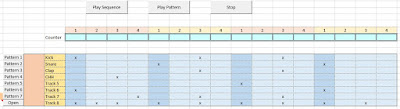
Who knew we'd be able to make music in Excel? It really is a miracle program. Watch the video below to see the drum machine in action.

The part of the video where Dylan gets into the description of getting the VBA code to work is especially interesting to me.
sleepTime = 60 / Range("C23").Value * 1000 / 4 '2 will need to change to 4 when i add more resolution
swingL = sleepTime + ((sleepTime / 5) * Range("C26"))
swingS = sleepTime - ((sleepTime / 5) * Range("C26"))
Below is a video of myself messing around with the sheet and showing you how to change the beats per minute (BPM aka tempo) or how to add a swing groove to the sequence.
This is one template you'll definitely want to try and play around with yourself. Download the drum machine spreadsheet for yourself using the link in Dylan's video.
I'll have to add drum machine to my list of unique uses for Microsoft Excel spreadsheets. If you have your own unique use of Excel please do let me know!
Sunday, April 5, 2020
2020 NFL Draft Game in Excel
It's been a couple of weeks without sports now and man has it been hard. I've especially missed March Madness and filling out brackets.
I've been trying to think of ways to make up for the loss of sports. The 2020 NFL Draft is one of the few sports-related things still scheduled to go on (for now). My friend Isaic gave me the idea to make a NFL Draft Game in Excel.

Inside this template I've listed the top 100 draft prospects according to ESPN. Each player (and the template is setup to handle ten players) are randomly assigned ten future NFL players by using a randomize macro. The earlier your players get drafter the better as the draft position counts for points and the lowest number of points wins!
Update 4/17/20 - new options added!
Based on some good user feedback I added the option where each player can now try to predict which team will select their players.

See how the Draft Game spreadsheet works in the video below:
Download the NFL Draft Game Excel Template here.
Even if you have no interest in the NFL, football, or drafts, you can still learn a bit about Excel by examining the random number generator macro, or the vlookup and sumif formulas used.
For now, the spreadsheet is setup to handle ten players. To add more, the formulas and macro will need to be modified. If enough people are interested in using this sheet, I will work on making it scalable so it can automatically adjust to the exact number of players.
Let me know if you like this game or if you have any suggestions or questions.
I've been trying to think of ways to make up for the loss of sports. The 2020 NFL Draft is one of the few sports-related things still scheduled to go on (for now). My friend Isaic gave me the idea to make a NFL Draft Game in Excel.

Inside this template I've listed the top 100 draft prospects according to ESPN. Each player (and the template is setup to handle ten players) are randomly assigned ten future NFL players by using a randomize macro. The earlier your players get drafter the better as the draft position counts for points and the lowest number of points wins!
Update 4/17/20 - new options added!
Based on some good user feedback I added the option where each player can now try to predict which team will select their players.

See how the Draft Game spreadsheet works in the video below:
Download the NFL Draft Game Excel Template here.
Even if you have no interest in the NFL, football, or drafts, you can still learn a bit about Excel by examining the random number generator macro, or the vlookup and sumif formulas used.
For now, the spreadsheet is setup to handle ten players. To add more, the formulas and macro will need to be modified. If enough people are interested in using this sheet, I will work on making it scalable so it can automatically adjust to the exact number of players.
Let me know if you like this game or if you have any suggestions or questions.
Subscribe to:
Posts (Atom)